硬汉嵌入式论坛

 找回密码
 立即注册
搜索
查看: 1223|回复: 2
收起左侧

[STM32H7] 基于STM32H7和ESP32S3的网络收音机开发实战指南[番外篇1]ESP32S3-N16R8+W5500运行MicroPython与socket网络编程【1-2】

[复制链接]

13

主题

24

回帖

68

积分

初级会员

积分
68
发表于 2025-12-12 18:26:54 | 显示全部楼层 |阅读模式
前言
    ESP32-S3 没有任何硬件以太网 MAC 外设(EMAC)所以无法直接接 LAN8720 / DP83848 等 PHY。ESP32、ESP32-P4才支持。
    这是esp32支持rmii(乐鑫这叫emac)的板子:
    ESP32-Ethernet-Kit相关官方资源【原理图,文档等】
        https://docs.espressif.com/projects/esp-dev-kits/en/latest/esp32/esp32-ethernet-kit/index.html
    故此只能支持spi接口的以太网芯片,这里使用w5500验证下socket通信性能能否满足不断流,和直接使用stm32h7+lan8720/8742的rmii进行对比。

    esp32s3内置的库包括:
     MicroPython v1.26.0-preview.434.g096ff8b9e on 2025-07-24; Generic ESP32S3 module with Octal-SPIRAM with ESP32S3
      这里的PSRAM,就是笔者之前测试的这个 ESP-PSRAM64H https://forum.anfulai.cn/forum.php?mod=viewthread&tid=130251&extra=
       PSRAM通过QSPI实现内存映射,相比SDRAM,带宽、速度都差点意思,但是体积小,连线少,价格低。
    Type "help()" for more information.
   >>>
    >>> help('modules')
        __main__          bluetooth         heapq             select
       _asyncio          btree             inisetup          socket
       _boot             builtins          io                ssl
       _espnow           cmath             json              struct
      _onewire          collections       machine           sys
      _thread           cryptolib         math              time
      _webrepl          deflate           micropython       tls
      aioespnow         dht               mip/__init__      uasyncio
      apa106            ds18x20           neopixel          uctypes
      array             errno             network           umqtt/robust
      asyncio/__init__  esp               ntptime           umqtt/simple
      asyncio/core      esp32             onewire           upysh
      asyncio/event     espnow            os                urequests
      asyncio/funcs     flashbdev         platform          vfs
      asyncio/lock      framebuf          random            webrepl
      asyncio/stream    gc                re                webrepl_setup
      binascii          hashlib           requests/__init__ websocket
      Plus any modules on the filesystem

常见以太网芯片
    DM9051, DP83848, IP101, KSZ8041, KSZ8081, KSZ8851SNL, LAN8710, LAN8720, RTL8201, W5500
    有兴趣的读者可以了解下rmii和mii以太网接口知识。

micropython下的w5500源码 与 requests网络库源码 与 接口调用
    micropython/extmod/network_wiznet5k.c
    https://github.com/micropython/m ... equests/__init__.py
    https://docs.micropython.org/en/latest/
    https://docs.micropython.org/en/latest/esp32/quickref.html
    https://docs.micropython.org/en/ ... ml#network.ipconfig

硬件准备
    esp32s3-n16r8 运行micropython 与 w5500【注意,它是硬件协议栈】通过spi接口相连,测试代码如下:
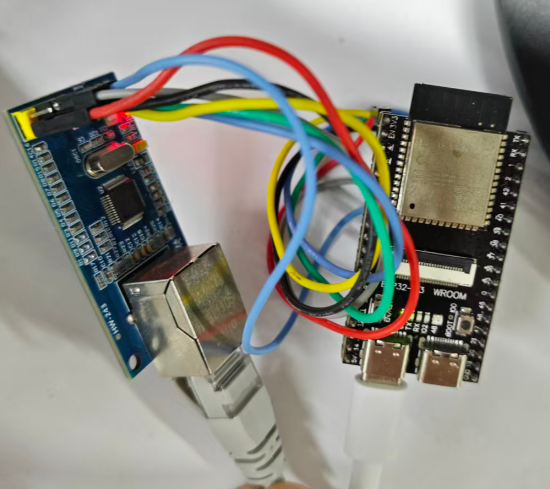
    w2.png
#-------------------------------------------------------
import network,time,requests,gc
from machine import Pin,SPI

#https://www.cnr.cn/gbzb/
spi= SPI(2, baudrate=80_000_000,sck=Pin(38), mosi=Pin(39), miso=Pin(40))
#print(spi) #debug
print('Free SRAM:{:.1f} KB'.format(gc.mem_free()/1024))

lan = network.LAN(spi=spi, phy_type=network.PHY_W5500, phy_addr=0,cs=Pin(41), int=Pin(42))
lan.active(True)
while not lan.isconnected():
    #lan.connect()
    time.sleep_ms(50)
    print(".", end="")
lansta = ('ETH_INITIALIZED', 'ETH_STARTED', 'ETH_STOPPED', 'ETH_CONNECTED', 'ETH_DISCONNECTED', 'ETH_GOT_IP')
print(lan.ipconfig("addr4"),lan.ifconfig(),lansta[lan.status()],lan.config("mac")) # ip, subnet, gateway, dns 默认DHCP获取网络参数

url = 'https://ngcdn001.cnr.cn/live/zgzs/13549842.ts' #这是临时测试的链接,照抄就返回错误了,过期了,读者需通过网页抓包最新的链接进行测试,见第一章内容
while True:
    start = time.ticks_ms()
    rsp=requests.get(url)
    buf = rsp.content
    print(len(buf),['{:02X}'.format(x) for x in buf[:32]])
    rsp.close()
    stop = time.ticks_ms()
    print('time:%d ms'%(stop-start))
    time.sleep(3)
    del rsp
    del buf
    gc.collect()

''' simple socket demo
import socket
addr = socket.getaddrinfo('micropython.org', 80)[0][-1]
s = socket.socket()
s.connect(addr)
s.send(b'GET / HTTP/1.1\r\nHost: micropython.org\r\n\r\n')

start = time.ticks_ms()
data = s.recv(1000)
end = time.ticks_ms()
print('%d ms'%(end-start),len(data),data)
s.close()
'''
#-------------------------------------------------------
测试结果揭晓
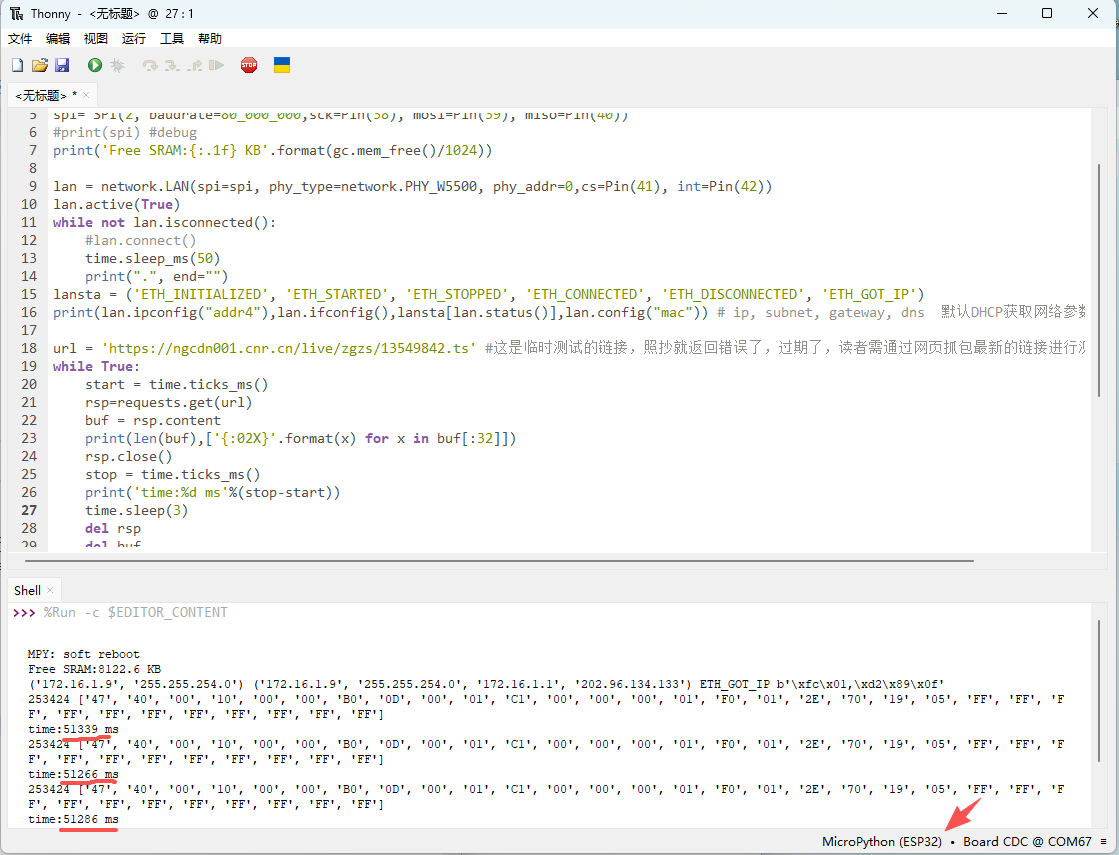
激动人心的时候到了,我们看看 247.4KB数据的传输时间是 -->
    253424 ['47', '40', '00', '10', '00', '00', 'B0', '0D', '00', '01', 'C1', '00', '00', '00', '01', 'F0', '01', '2E', '70', '19', '05', 'FF', 'FF', 'FF', 'FF', 'FF', 'FF', 'FF', 'FF', 'FF', 'FF', 'FF']
    time:51339 ms
    253424 ['47', '40', '00', '10', '00', '00', 'B0', '0D', '00', '01', 'C1', '00', '00', '00', '01', 'F0', '01', '2E', '70', '19', '05', 'FF', 'FF', 'FF', 'FF', 'FF', 'FF', 'FF', 'FF', 'FF', 'FF', 'FF']
    time:51266 ms
    w1.png

     好了,不用玩了。根据测试结果,平均通信时间高达51s【相当于网速4.9 KB/s】,获取直播流的场景,完全无法使用,放弃。
     笔者猜测原因:esp32s3和w5500 spi接口通信虽然有几十M,但是5500的性能有限,另外esp32s3端需要将从5500读取的数据缓存到PSRAM里,也拖累了速度。最后就是esp32s3的mcu性能问题,和stm32h7差距较大。
这里就不深究了,验证完了,该方案无法满足性能要求。
     后面也测了下CH395+spi+stm32h7 c语言版本[https://www.wch.cn/products/CH395.html],时间也得几秒了,也不合适。这颗ic 驱动时序上各种delay, 本就不快的spi时钟[<=40MHz],这种场合是用不了了。并口也是时序上强制delay读/写,完全无法全力发挥性能。

参考资源
  chatGPT
   w5500官方在线资料:https://wiznet.io/products/ethernet-chips/w5500

扩展:几个有意思的立创网络收音机开源项目
介么HIFI的无损网络收音机...
https://oshwhub.com/twist_66/i-can-listen-to-the-undamaged-in
超级简单就能复刻的网络收音...
https://oshwhub.com/hudiesudie/chao-ji-jian-dan-ban-wang-luo-shou-yin-ji-2025-nian-1-yue-6-ri-ban
ESP32S3_MiniWebRadio
https://oshwhub.com/bd8cg-open-source/esp32s3_miniwebradio

有2个不开源的,有点意思,mark下,硬件成本不对标,功能看看有啥新颖的
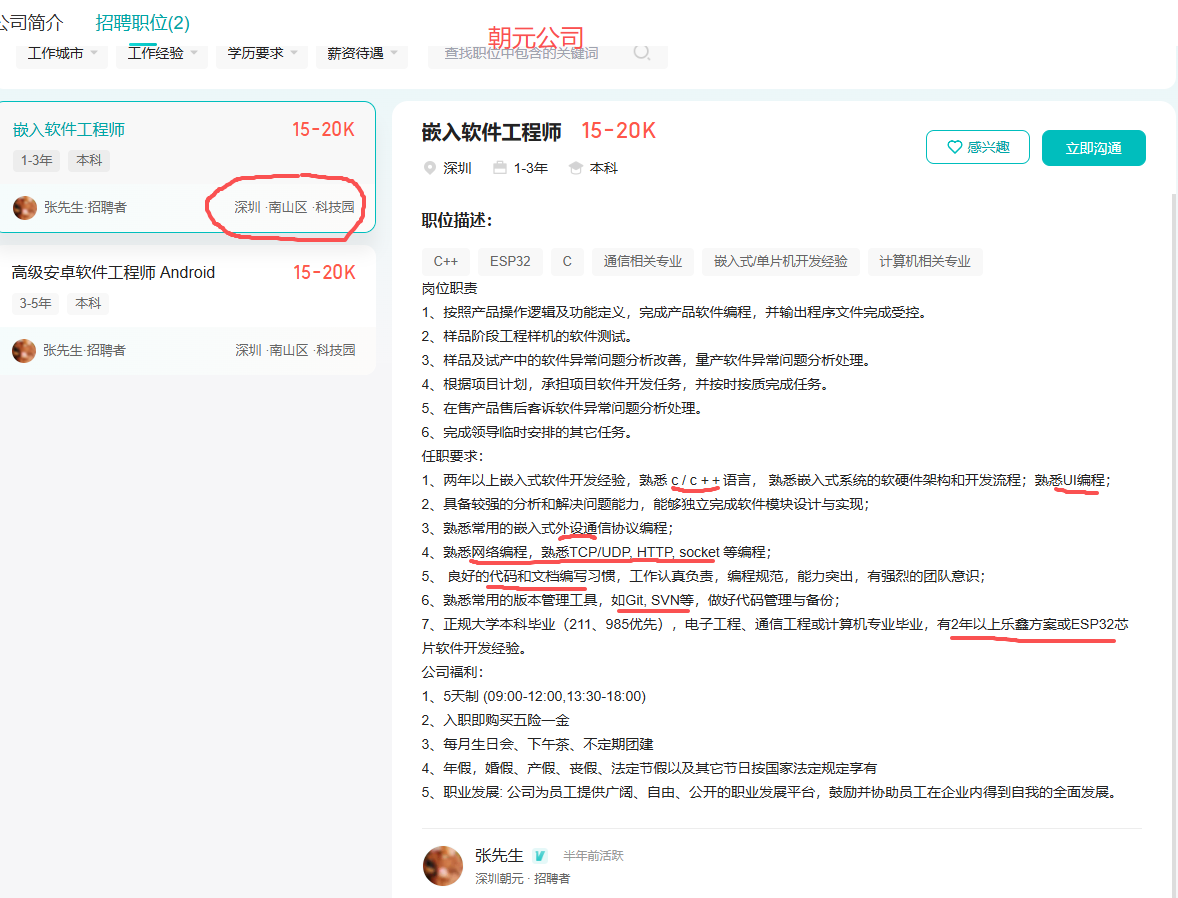
1. 朝元A8W二代网络收音机
https://detail.tmall.com/item.htm?abbucket=7&id=658087995914&mi_id=0000CDZmSZMe1vXjpqp1TH83Ct0zw6gcFRcw6d2MXtH6tAQ&ns=1&priceTId=213e09af17655236163967451e0e98&skuId=5046326367994&spm=a21n57.1.hoverItem.1&utparam=%7B%22aplus_abtest%22%3A%2217c987390da659baf923689a706e03f0%22%7D&xxc=taobaoSearch
可能用的MTK联发科芯片【没看到拆解视频和帖子】,也只有它可以做到有性能,有基带,还便宜。这个产品吧:功能层面看吧,没啥可参考的,应该是给钱给喜马拉雅和网易云,调人家的API。至于支持其它第三方网络电台和本地FM(用的NXP的TEF6686车载收音机芯片,很多产品对性能有要求的,都是这颗IC,见太多了)吧,也是常规功能。
https://chaoyuanyy.tmall.com/search.htm?spm=a1z10.1-b.0.0.54d12de5KYyvXj&search=y
cy.png
这个招聘要求不高,一直玩esp32 idf/arduino编程的读者,可以去试试,看着还可以。有兴趣的读者知道方向了吧:UI设计,C & C++功底,网络编程。也是当前这个项目,频繁涉及的。C++这个项目可能只有 esp32s3使用arduino开发,才会用到。
嗯,讲完了,该公司的人看见了,记得给我宣传费用喝杯卡布奇诺。

2. 小米网络收音机用的MTK7688
https://tieba.baidu.com/p/4526524579
小米这个声道设计真不错,应该是代工的,厂家水平不错的,不知道为啥不升级下,加些功能出新品,这个停产了。

结语
   看来跑python,性能损失不小。还得强大的MCU配合高速通信接口,不管是c、c++(arduino)还是python才能达到流畅播放的要求。
   本文的测试,只针对当前应用的需求大致评估性能,不代表真实的网络吞吐能力,得折腾下iperf来验证验证,本文不具体测试了。
   https://github.com/micropython/m ... ys/iperf3/iperf3.py
    有兴趣的可以读读源码,看看网络性能是怎么测试出来的。

下一个目标
    接下来重点就是支持各种本地(U盘/TF卡)音频解码了,目标对齐vs1053芯片(Ogg Vorbis / MP3 / AAC / WMA / FLAC / MIDI)支持的【https://www.vlsi.fi/en/products/vs1053.html】,我们的也要支持。GUI先靠后点,后续再折腾LVGL。

附件包括    esp32s3的官方micropython固件
ESP32_GENERIC_S3-SPIRAM_OCT-20250911-v1.26.1.bin (1.66 MB, 下载次数: 6)


回复

使用道具 举报

13

主题

24

回帖

68

积分

初级会员

积分
68
 楼主| 发表于 2026-8-17 16:13:52 | 显示全部楼层
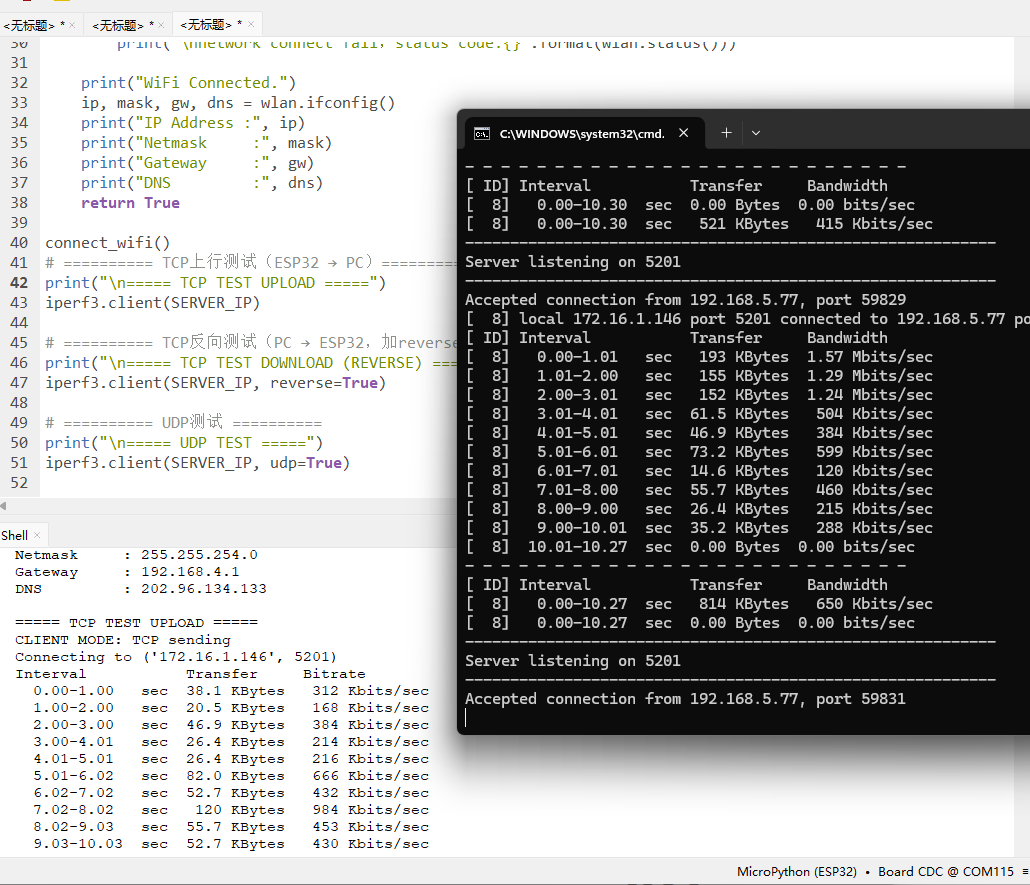
#demo使用iperf3测试wifi的tcp udp性能
import iperf3,time
import network,socket,requests,ntptime

SERVER_IP = '172.16.1.146' #电脑主机ip
def connect_wifi():
    wlan = network.WLAN(network.STA_IF)
    wlan.active(True)
    if wlan.isconnected(): #仅已连接才断开
        wlan.disconnect() #防止wifi协议栈内部错误 print("MAC:", ":".join("%02X" % b for b in wlan.config("mac")))
        while wlan.isconnected(): #'0.0.0.0'
            pass
    if not wlan.isconnected():
        print("Connecting WiFi...")
        wlan.connect('账号。。。','密码。。。')
        max_wait = 10
        while not wlan.isconnected():
            max_wait -= 1
            if max_wait <= 0:
                print("WiFi Connect Timeout")  
                print(".", end="")
            time.sleep(1)
    if wlan.status() == network.STAT_GOT_IP:
        print('\nconnection successful.',network.country(),network.hostname()) #连接成功,Wi&#8209;Fi的国家代码-中国CN,默认XX,设备主机名
    elif wlan.status() == network.STAT_NO_AP_FOUND:
        print("\nfailed because no access point replied.") #未找到指定的 Wi-Fi 接入点
    elif wlan.status() == network.STAT_WRONG_PASSWORD:
        print("\nfailed due to incorrect password.") #输入的 Wi-Fi 密码错误
    else: #STAT_IDLE / STAT_CONNECTING / STAT_CONNECT_FAIL
        print('\nnetwork connect fail,status code:{}'.format(wlan.status()))
  
    print("WiFi Connected.")
    ip, mask, gw, dns = wlan.ifconfig()
    print("IP Address :", ip)
    print("Netmask     :", mask)
    print("Gateway     :", gw)
    print("DNS         :", dns)
    return True

connect_wifi()
# ========== TCP上行测试(ESP32 → PC)==========
print("\n===== TCP TEST UPLOAD =====")
iperf3.client(SERVER_IP)

# ========== TCP反向测试(PC → ESP32,加reverse=True)==========
print("\n===== TCP TEST DOWNLOAD (REVERSE) =====")
iperf3.client(SERVER_IP, reverse=True)

# ========== UDP测试 ==========
print("\n===== UDP TEST =====")
iperf3.client(SERVER_IP, udp=True)

测试截图:
1.png
回复

使用道具 举报

13

主题

24

回帖

68

积分

初级会员

积分
68
 楼主| 发表于 2026-8-17 16:21:47 | 显示全部楼层

    iPerf是一个网络性能测试工具。iPerf可以测试最大TCP和UDP带宽性能,具有多种参数和UDP特性,可以根据需要调整,可以报告带宽、延迟抖动和数据包丢失。目前已经发布有Window,iOS,Android和Linux版本程序。主要有iPerf2和iPerf3两个版本,2与3不兼容。


windows下安装iperf3,启动服务端     https://iperf.fr/iperf-download.php


esp32 MicroPython固件的基础上,上传官方提供的iperf3.py
https://github.com/micropython/micropython-lib/blob/master/python-ecosys/iperf3/iperf3.py


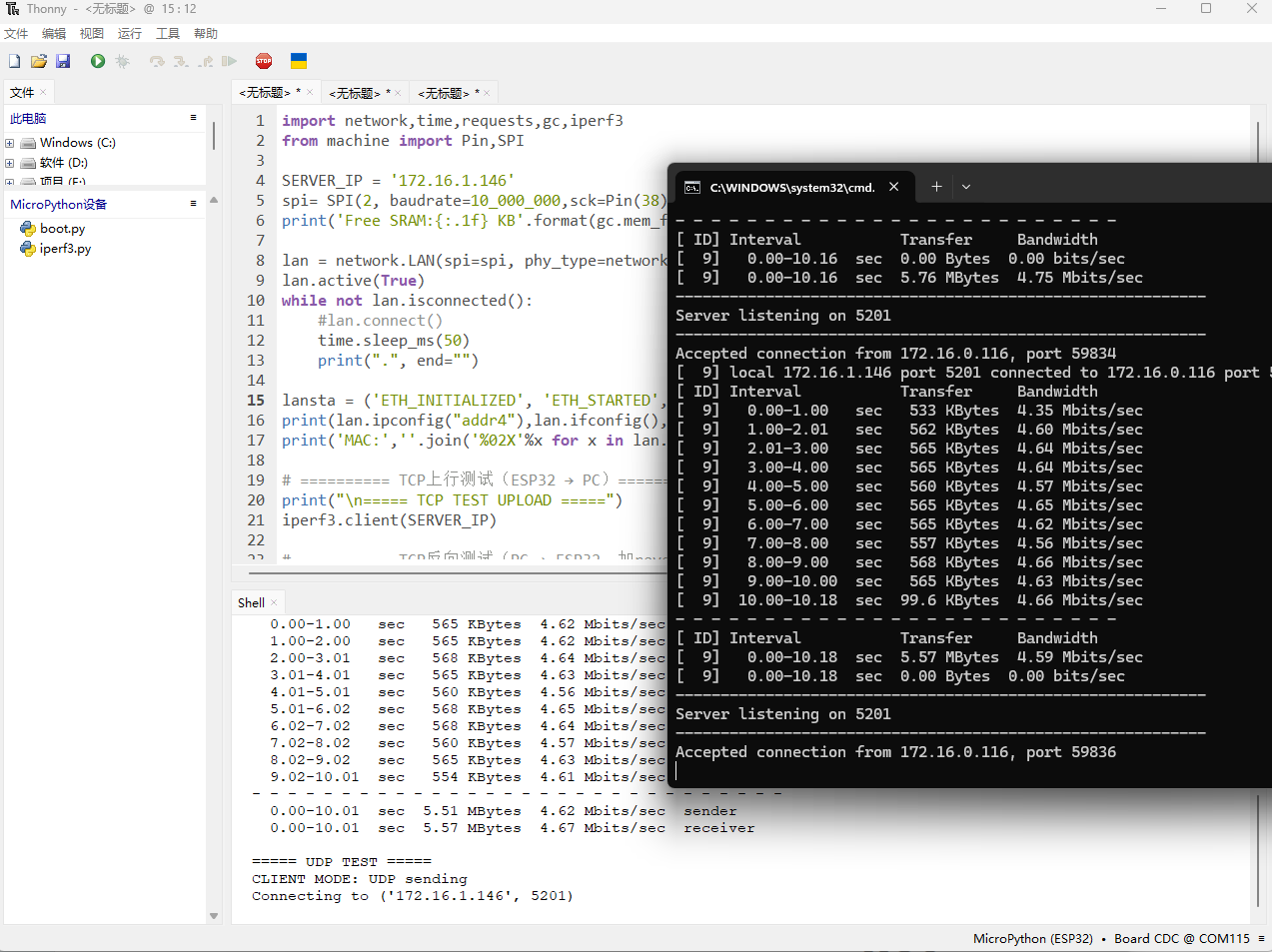
#demo使用iperf3测试w5500以太网的tcp udp性能


import network,time,requests,gc,iperf3
from machine import Pin,SPI

SERVER_IP = '172.16.1.146' #电脑主机ip,运行iperf3服务端
spi= SPI(2, baudrate=10_000_000,sck=Pin(38), mosi=Pin(39), miso=Pin(40))
print('Free SRAM:{:.1f} KB'.format(gc.mem_free()/1024))

lan = network.LAN(spi=spi, phy_type=network.PHY_W5500, phy_addr=0,cs=Pin(41), int=Pin(42))
lan.active(True)
while not lan.isconnected():
    #lan.connect()
    time.sleep_ms(50)
    print(".", end="")
   
lansta = ('ETH_INITIALIZED', 'ETH_STARTED', 'ETH_STOPPED', 'ETH_CONNECTED', 'ETH_DISCONNECTED', 'ETH_GOT_IP')
print(lan.ipconfig("addr4"),lan.ifconfig(),lansta[lan.status()]) # ip, subnet, gateway, dns 默认DHCP获取网络参数
print('MAC:',''.join('%02X'%x for x in lan.config("mac")))

# ========== TCP上行测试(ESP32 → PC)==========
print("\n===== TCP TEST UPLOAD =====")
iperf3.client(SERVER_IP)

# ========== TCP反向测试(PC → ESP32,加reverse=True)==========
print("\n===== TCP TEST DOWNLOAD (REVERSE) =====")
iperf3.client(SERVER_IP, reverse=True)

# ========== UDP测试 ==========
print("\n===== UDP TEST =====")
iperf3.client(SERVER_IP, udp=True)

测试截图:(由于以太网经过交换机,有点不太稳定,有时只有几KB/s,有时几百KB/s)
1.png


给出circuitpython版本的测试,性能差不多,没啥继续分析价值了。

import adafruit_connection_manager
import adafruit_requests
import board
import busio,iperf
import digitalio
from adafruit_wiznet5k.adafruit_wiznet5k import WIZNET5K

SERVER_IP = '172.16.1.146'
print("Wiznet5k WebClient Test")

TEXT_URL = "http://wifitest.adafruit.com/testwifi/index.html"
JSON_URL = "http://site.api.espn.com/apis/site/v2/sports/baseball/mlb/scoreboard"

# For Adafruit Ethernet FeatherWing
cs = digitalio.DigitalInOut(board.GPIO41)
# For Particle Ethernet FeatherWing
# cs = digitalio.DigitalInOut(board.D5)
spi_bus = busio.SPI(board.GPIO38, MOSI=board.GPIO39, MISO=board.GPIO40)

# Initialize ethernet interface with DHCP
eth = WIZNET5K(spi_bus, cs,reset=None) #dhcp分配ip地址等参数

# Initialize a requests session
pool = adafruit_connection_manager.get_radio_socketpool(eth)
ssl_context = adafruit_connection_manager.get_radio_ssl_context(eth)
requests = adafruit_requests.Session(pool, ssl_context)

print("Chip Version:", eth.chip)
print("MAC Address:", [hex(i) for i in eth.mac_address])
print("My IP address is:", eth.pretty_ip(eth.ip_address),eth.ifconfig)
print("IP lookup adafruit.com: {}".format(eth.pretty_ip(eth.get_host_by_name("adafruit.com"))))

# ===================== TCP上行测试 (ESP32 → PC) =====================
print("\n==== TCP UPLOAD TEST ====")
iperf.client(SERVER_IP, ttime=10)

# ===================== TCP反向测试 (PC → ESP32,下行) =====================
print("\n==== TCP DOWNLOAD TEST (REVERSE) ====")
iperf.client(SERVER_IP, reverse=True, ttime=10)

# ===================== UDP测试 =====================
print("\n==== UDP TEST ====")
iperf.client(SERVER_IP, udp=True, ttime=10)


非DHCP,固定ip参数的测试版本:

import adafruit_connection_manager
import adafruit_requests
import board,time,gc
import busio,iperf
import digitalio,supervisor
from adafruit_wiznet5k.adafruit_wiznet5k import WIZNET5K

TEXT_URL = "http://wifitest.adafruit.com/testwifi/index.html"
SERVER_IP = '172.16.1.146'

# Setup your network configuration below
IP_ADDRESS = (172, 16, 1, 107)
SUBNET_MASK = (255, 255, 254, 0)
GATEWAY_ADDRESS = (172, 16, 1, 1)
DNS_SERVER = (8, 8, 8, 8)

print("Wiznet5k WebClient Test (no DHCP)")

cs = digitalio.DigitalInOut(board.GPIO41)
spi_bus = busio.SPI(board.GPIO38, MOSI=board.GPIO39, MISO=board.GPIO40)

# Initialize ethernet interface without DHCP
eth = WIZNET5K(spi_bus, cs, is_dhcp=False)

# Set network configuration
eth.ifconfig = (IP_ADDRESS, SUBNET_MASK, GATEWAY_ADDRESS, DNS_SERVER)

# Initialize a requests session
pool = adafruit_connection_manager.get_radio_socketpool(eth)
ssl_context = adafruit_connection_manager.get_radio_ssl_context(eth)
requests = adafruit_requests.Session(pool, ssl_context)

print("Chip Version:", eth.chip)
print("MAC Address:", [hex(i) for i in eth.mac_address])
print("My IP address i    gc.collect()s:", eth.pretty_ip(eth.ip_address))
print("IP lookup adafruit.com: {}".format(eth.pretty_ip(eth.get_host_by_name("adafruit.com"))))

#https://www.cnr.cn/gbzb/
#https://docs.circuitpython.org/en/latest/shared-bindings/time/
url = 'https://ngcdn001.cnr.cn/live/zgzs/15691998.ts'
while 0:
    start = supervisor.ticks_ms()
    rsp=requests.get(url)
    buf = rsp.content
    print(len(buf),['{:02X}'.format(x) for x in buf[:32]])
    rsp.close()
    stop = supervisor.ticks_ms()
    print('time:%d ms'%(stop-start))
    time.sleep(3)
    del rsp
    del buf
    gc.collect()
   
# ===================== TCP上行测试 (ESP32 → PC) =====================
print("\n==== TCP UPLOAD TEST ====")
iperf.client(SERVER_IP, ttime=10)

# ===================== TCP反向测试 (PC → ESP32,下行) =====================
print("\n==== TCP DOWNLOAD TEST (REVERSE) ====")
iperf.client(SERVER_IP, reverse=True, ttime=10)

# ===================== UDP测试 =====================
print("\n==== UDP TEST ====")
iperf.client(SERVER_IP, udp=True, ttime=10)


参考资料:

https://docs.micropython.org/en/v1.20.0/esp32/quickref.html#lan
https://github.com/orgs/micropython/discussions/11446
https://micropython.org/download/?port=esp32


回复

使用道具 举报

您需要登录后才可以回帖 登录 | 立即注册

本版积分规则

QQ|小黑屋|Archiver|手机版|硬汉嵌入式论坛

GMT+8, 2026-9-7 09:27 , Processed in 0.148683 second(s), 26 queries .

Powered by Discuz! X3.4 Licensed

Copyright © 2001-2023, Tencent Cloud.

快速回复 返回顶部 返回列表