硬汉嵌入式论坛

 找回密码
 立即注册
搜索
查看: 504|回复: 4
收起左侧

[J-Link] CLion单片机开发环境,体面的使用JLink烧录固件,正确打开方式,保证不会弄伤你的鳞片!

[复制链接]

1

主题

6

回帖

9

积分

新手上路

积分
9
发表于 2026-9-12 17:11:13 | 显示全部楼层 |阅读模式
本帖最后由 magic_key 于 2026-9-12 23:02 编辑


当我们使用OpenOCD驱动J-Link烧录固件,可能就会碰到这个问题,报错如下:


Warn : Failed to open device: LIBUSB_ERROR_NOT_FOUND
Error: No J-Link device found


J-Link及其相关工具,例如J-Link Commander、J-Flash 、J-Link RTT Viewer ..... 使用LibUSB驱动。
而OpenOCD使用WinUSB驱动J-Link,导致了这个报错。


糟糕且治标不治本的办法,就是使用USBDriverTool,常驻后台,来回切换USB驱动。
OpenOCD + J-Link与J-Link Commander、Keil MDK的USB驱动,互相排斥,无法同时使用。


这样整的话,迟早会弄伤我们的鳞片。哦,我的天呐,这也太不体面了!
这就好比,用恒河水做的印度糊糊。吃完,还要让你说一句:干净又卫生啊,兄弟们。


在CLion下开发QT界面,通常都会使用外部工具,去调用QT的UI布局设计工具。
业务代码实现与ui布局设计分离,还不用重复造轮子。


巧的是,J-Link软件提供了外部调用和接口,配合CLion IDE的外部工具加按键映射。
使用快捷键,就能实现一键烧录固件。
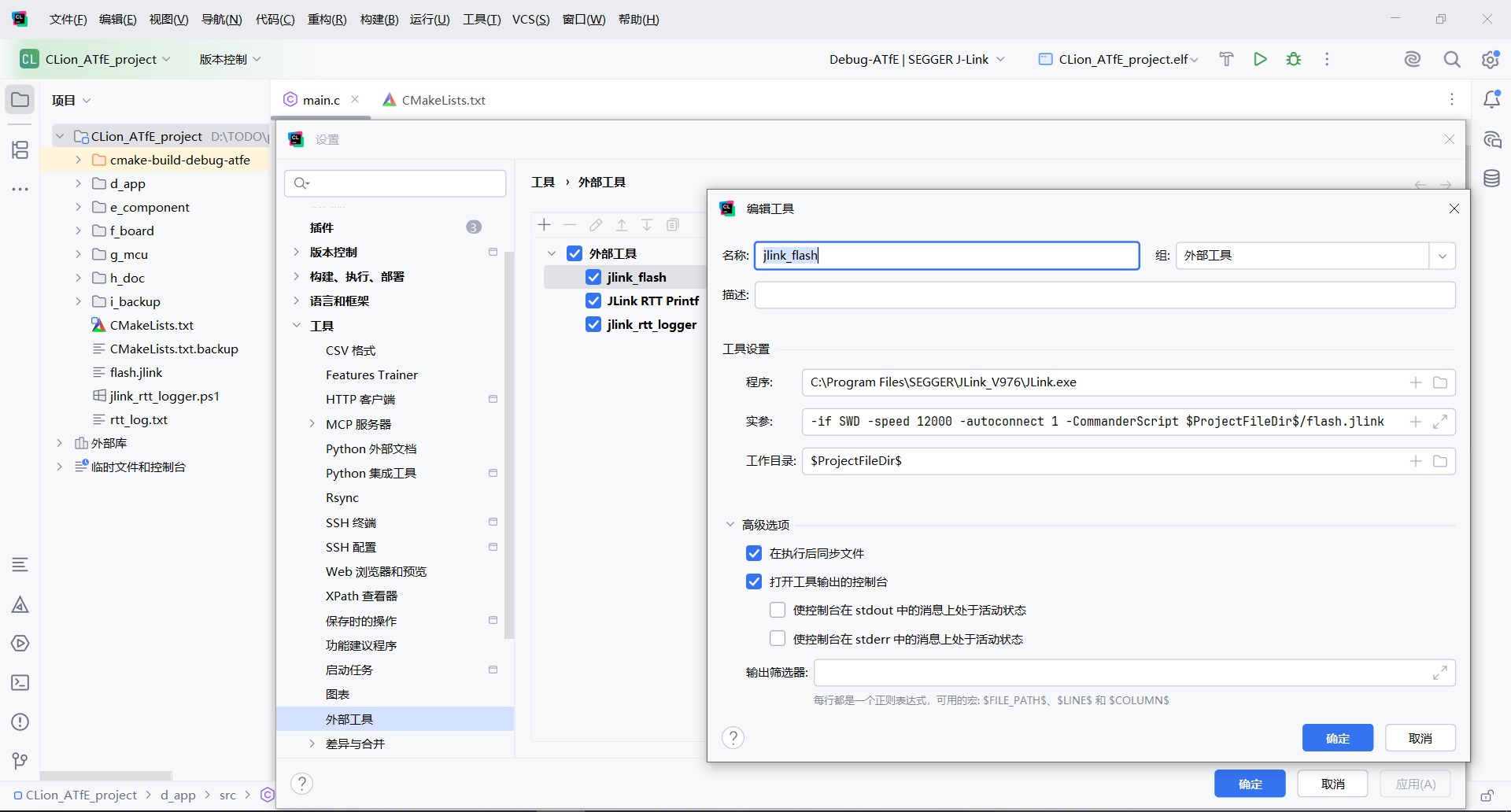

CLion外部工具调用 J-Link Commander一键烧录固件.png

CLion => 设置 => 工具 => 外部工具
名称:               jlink_flash
程序:              C:\Program Files\SEGGER\JLink_V976\JLink.exe
实参:              -if SWD -speed 12000 -autoconnect 1 -CommanderScript $ProjectFileDir$/flash.jlink
工作目录:       $ProjectFileDir$
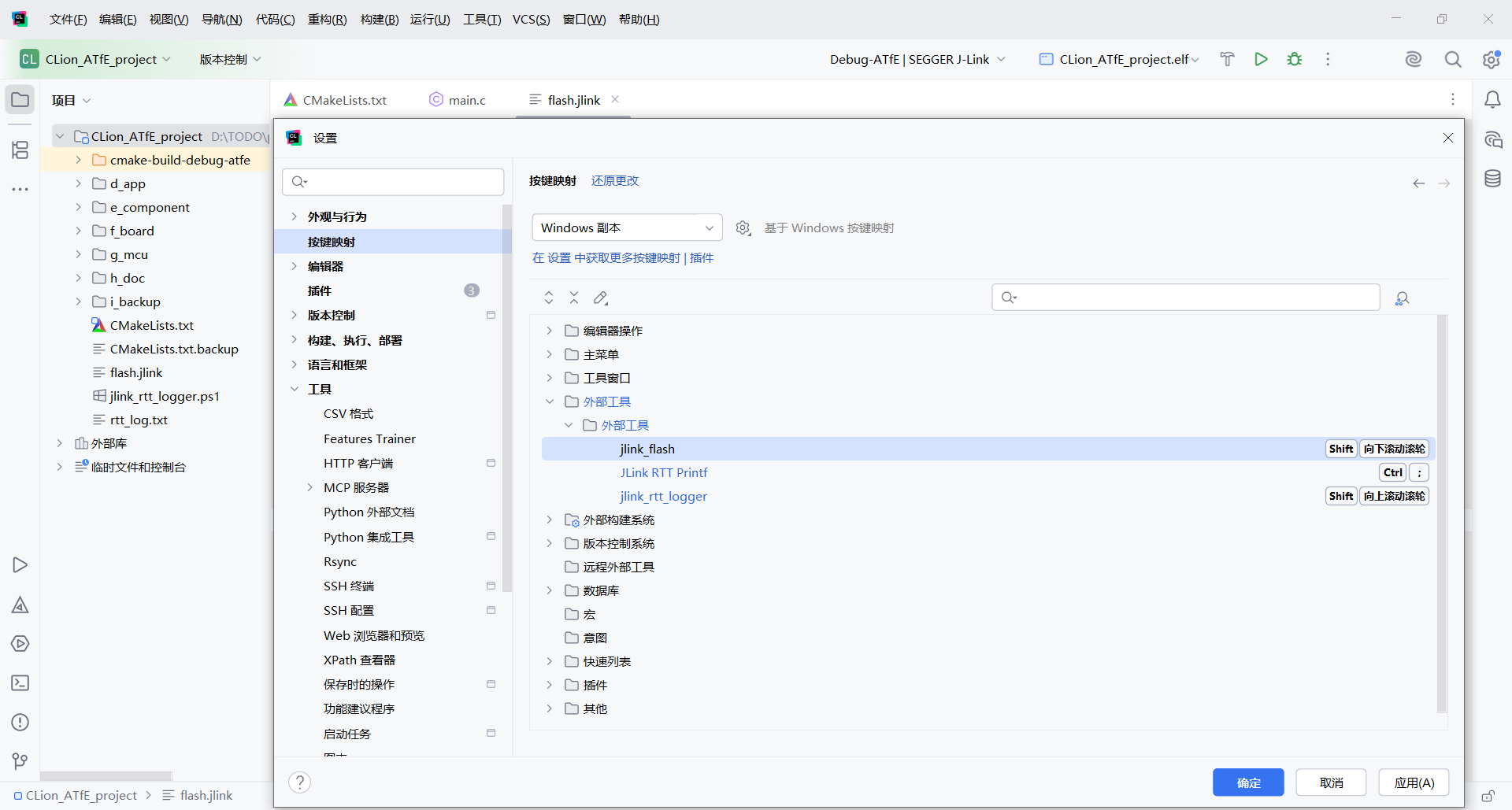

CLion外部工具运行flash.jlink按键映射.png

CLion => 设置 => 按键映射 => 外部工具 => jlink_flash,添加键盘快捷键或鼠标快捷方式。
一些好一点点的鼠标有双滚轮,多出来的一个滚轮,用来做快捷键再适合不过了。
鼠标向下滚动滚轮,一键烧录单片机固件。实在是太方便,太优雅了!(旁白:你说的,一点都对!)
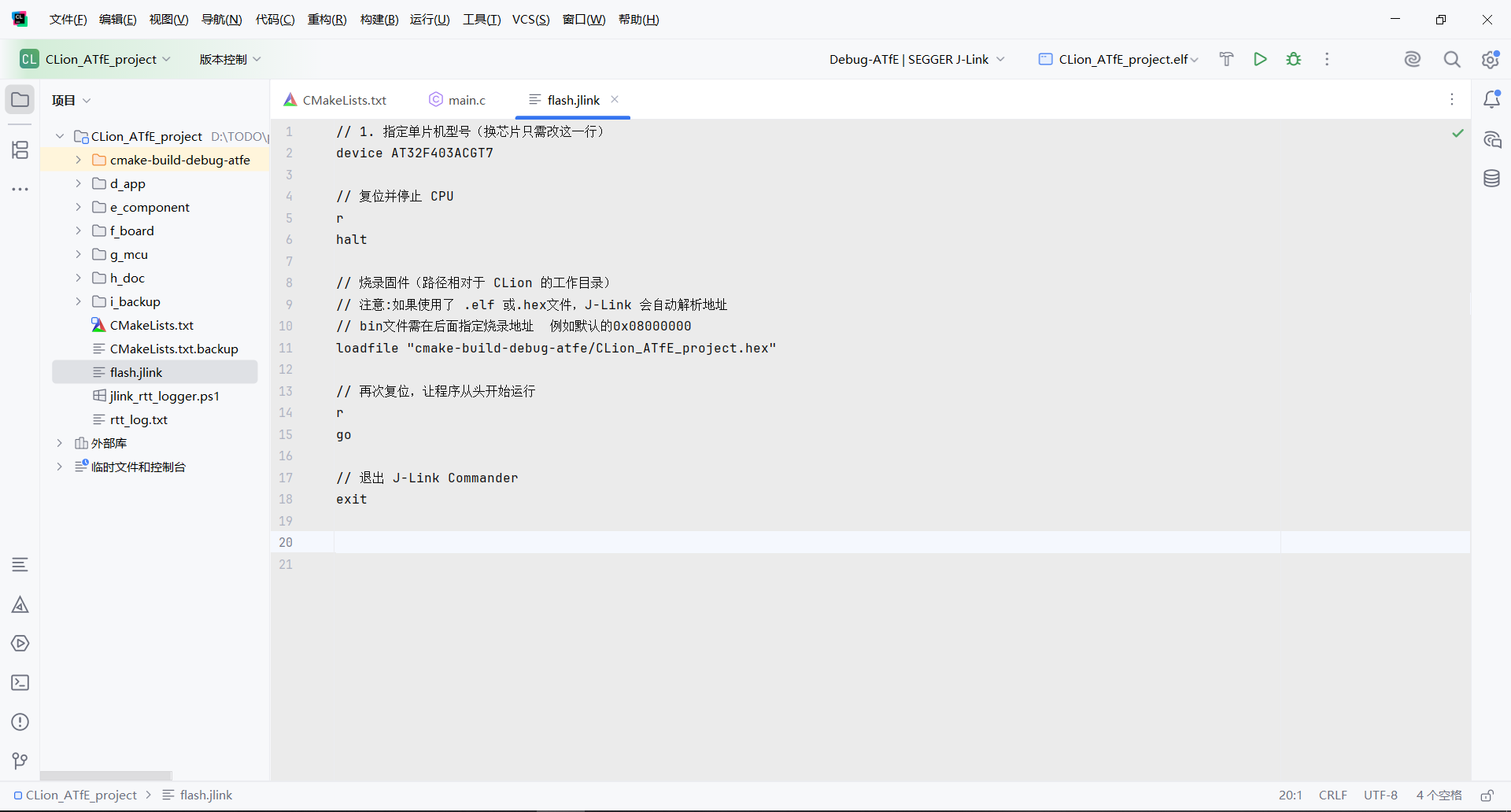


flash.jlink内容.png

项目根目录下,创建flash.jlink文件,内容如下:
// 1. 指定单片机型号(换芯片只需改这一行)
device AT32F403ACGT7

// 复位并停止 CPU
r
halt

// 烧录固件(路径相对于 CLion 的工作目录)
// 注意:如果使用了 .elf 或.hex文件,J-Link 会自动解析地址,bin文件需在后面指定烧录地址  例如默认的
0x08000000
loadfile "cmake-build-debug-atfe/CLion_ATfE_project.hex"

// 再次复位,让程序从头开始运行
r
go

// 退出 J-Link Commander
exit
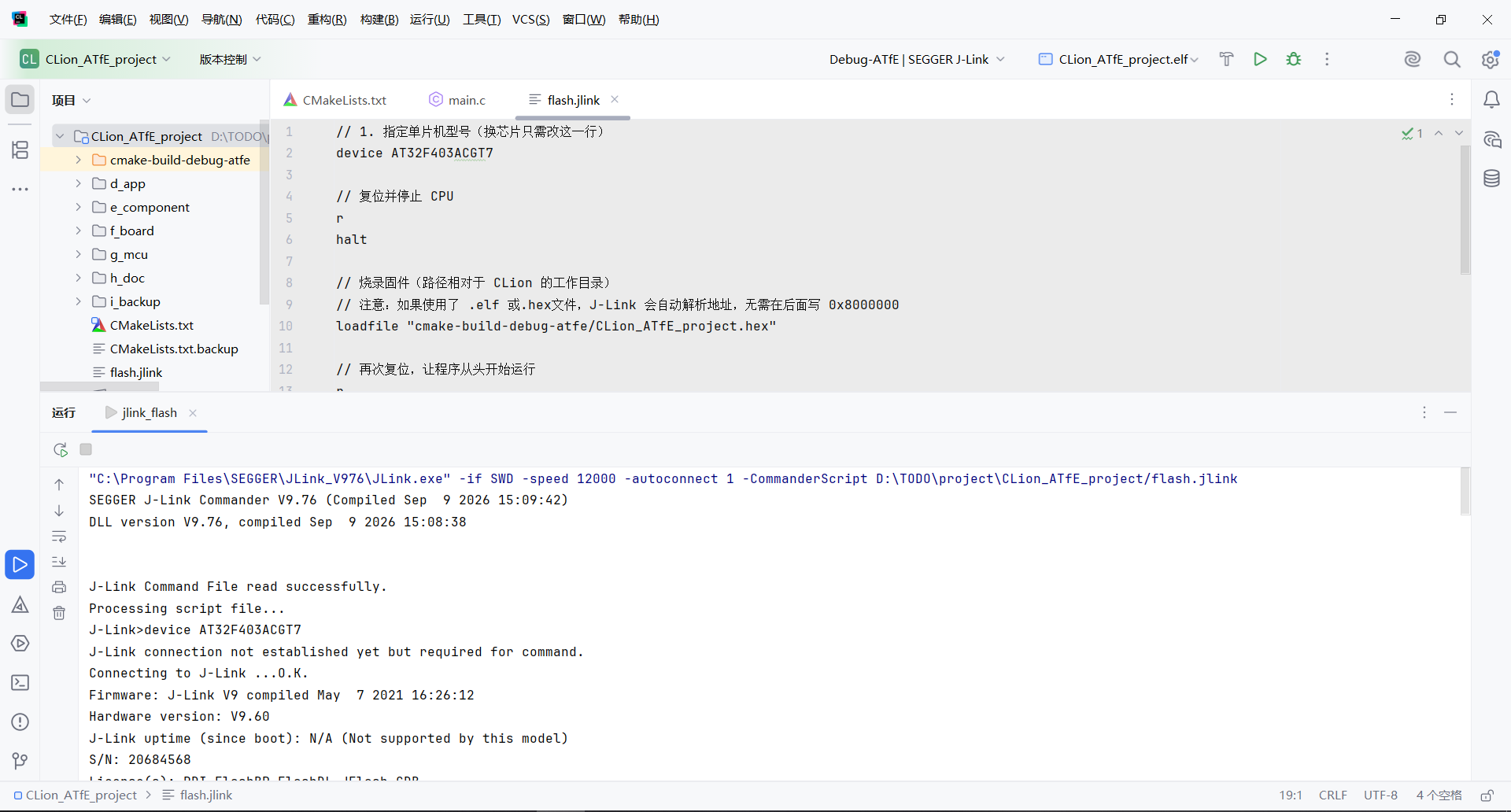


CLion外部工具运行flash.jlink.png

运行窗口输出信息如下:
"C:\Program Files\SEGGER\JLink_V976\JLink.exe" -if SWD -speed 12000 -autoconnect 1 -CommanderScript D:\TODO\project\CLion_ATfE_project/flash.jlink
SEGGER J-Link Commander V9.76 (Compiled Sep  9 2026 15:09:42)
DLL version V9.76, compiled Sep  9 2026 15:08:38


J-Link Command File read successfully.
Processing script file...
J-Link>device AT32F403ACGT7
J-Link connection not established yet but required for command.
Connecting to J-Link ...O.K.
Firmware: J-Link V9 compiled May  7 2021 16:26:12
Hardware version: V9.60
J-Link uptime (since boot): N/A (Not supported by this model)
S/N: 20684568
License(s): RDI,FlashBP,FlashDL,JFlash,GDB
VTref=3.327V
J-Link>r
Target connection not established yet but required for command.
Device "AT32F403ACGT7" selected.


Connecting to target via SWD
InitTarget() start
DAP initialized successfully.
  No Protection is set.
InitTarget() end - Took 5.01ms
Found SW-DP with ID 0x2BA01477
DPIDR: 0x2BA01477
CoreSight SoC-400 or earlier
Scanning AP map to find all available APs
AP[1]: Stopped AP scan as end of AP map has been reached
AP[0]: AHB-AP (IDR: 0x24770011, ADDR: 0x00000000)
Iterating through AP map to find AHB-AP to use
AP[0]: Core found
AP[0]: AHB-AP ROM base: 0xE00FF000
CPUID register: 0x410FC241. Implementer code: 0x41 (ARM)
Found Cortex-M4 r0p1, Little endian.
FPUnit: 6 code (BP) slots and 2 literal slots
CoreSight components:
ROMTbl[0] @ E00FF000
[0][0]: E000E000 CID B105E00D PID 000BB00C SCS-M7
[0][1]: E0001000 CID B105E00D PID 003BB002 DWT
[0][2]: E0002000 CID B105E00D PID 002BB003 FPB
[0][3]: E0000000 CID B105E00D PID 003BB001 ITM
[0][4]: E0040000 CID B105900D PID 000BB9A1 TPIU
[0][5]: E0041000 CID B105900D PID 000BB925 ETM
Memory zones:
  Zone: "Default" Description: Default access mode
Cortex-M4 identified.
Reset delay: 0 ms
Reset type: NORMAL (https://kb.segger.com/J-Link_Reset_Strategies)
Reset: Halt core after reset via DEMCR.VC_CORERESET.
Reset: Reset device via AIRCR.SYSRESETREQ.
J-Link>halt
PC = 08001230, CycleCnt = 00000000
R0 = 00000000, R1 = 00000000, R2 = 00000000, R3 = 00000000
R4 = 00000000, R5 = 00000000, R6 = 00000000, R7 = 00000000
R8 = 00000000, R9 = 00000000, R10= 00000000, R11= 00000000
R12= 00000000
SP(R13)= 20018000, MSP= 20018000, PSP= 00000000, R14(LR) = FFFFFFFF
XPSR = 01000000: APSR = nzcvq, EPSR = 01000000, IPSR = 000 (NoException)
CFBP = 00000000, CONTROL = 00, FAULTMASK = 00, BASEPRI = 00, PRIMASK = 00


FPS0 = 00000000, FPS1 = 00000000, FPS2 = 00000000, FPS3 = 00000000
FPS4 = 00000000, FPS5 = 00000000, FPS6 = 00000000, FPS7 = 00000000
FPS8 = 00000000, FPS9 = 00000000, FPS10= 00000000, FPS11= 00000000
FPS12= 00000000, FPS13= 00000000, FPS14= 00000000, FPS15= 00000000
FPS16= 00000000, FPS17= 00000000, FPS18= 00000000, FPS19= 00000000
FPS20= 00000000, FPS21= 00000000, FPS22= 00000000, FPS23= 00000000
FPS24= 00000000, FPS25= 00000000, FPS26= 00000000, FPS27= 00000000
FPS28= 00000000, FPS29= 00000000, FPS30= 00000000, FPS31= 00000000
FPSCR= 00000000
J-Link>loadfile "cmake-build-debug-atfe/CLion_ATfE_project.hex"
'loadfile': Performing implicit reset & halt of MCU.
Reset type: NORMAL (https://kb.segger.com/J-Link_Reset_Strategies)
Reset: Halt core after reset via DEMCR.VC_CORERESET.
Reset: Reset device via AIRCR.SYSRESETREQ.
Downloading file [cmake-build-debug-atfe/CLion_ATfE_project.hex]...
J-Link: Flash download: Bank 0 @ 0x08000000: 1 range affected (6144 bytes)
J-Link: Flash download: Total: 0.339s (Prepare: 0.044s, Compare: 0.055s, Erase: 0.150s, Program: 0.043s, Verify: 0.010s, Restore: 0.035s)
J-Link: Flash download: Program & Verify speed: 112 KB/s
O.K.
J-Link>r
Reset delay: 0 ms
Reset type: NORMAL (https://kb.segger.com/J-Link_Reset_Strategies)
Reset: Halt core after reset via DEMCR.VC_CORERESET.
Reset: Reset device via AIRCR.SYSRESETREQ.
J-Link>go
Memory map 'after startup completion point' is active
J-Link>exit


Script processing completed.


进程已结束,退出代码为 0


======================================  一点都不华丽的分割线  ======================================
J-Link还有很多工具,由此衍生一些其他玩法。


比如CLion外部工具调用J-Link RTT Viewer ,输出J-Link RTT 打印信息
名称:              J-Link RTT Viewer Printf

程序:              C:\Program Files\SEGGER\JLink_V976\JLinkRTTViewer.exe
实参:              --device AT32F403ACGT7 --interface SWD --speed 12000 --autoconnect
工作目录:       $ProjectFileDir$


CLion外部工具调用PowerShell脚本,PowerShell脚本里又调用J-Link RTT Logger,
实现自动化保存指定时长的RTT  Printf日志文件

名称:              jlink_rtt_logger

程序:              powershell.exe
实参:              -NoProfile -ExecutionPolicy Bypass -File "$ProjectFileDir$\jlink_rtt_logger.ps1"
工作目录:       $ProjectFileDir$


项目根目录下,创建jlink_rtt_logger.ps1文件,内容如下:
# =====================================================================
#  J-Link RTT Logger 定时日志记录脚本(此文件必须保存为 UTF-8 with BOM)
# ---------------------------------------------------------------------
#  功能:启动 JLinkRTTLogger 记录指定时长的 RTT 数据,到时自动停止。
#  用途:通过 CLion 外部工具一键调用,无需手动打开/关闭 RTT Viewer
# =====================================================================
# 强制 PowerShell UTF-8 输出,否则 CLion 控制台(按 UTF-8 解析)会乱码
[Console]::OutputEncoding = [System.Text.Encoding]::UTF8
$OutputEncoding = [System.Text.Encoding]::UTF8

# =====================================================================
#  【配置区】换芯片、换速度、换时长,只改下面这几行即可
# =====================================================================
# J-Link 安装目录下 RTT Logger 的完整路径
$JLinkPath   = "C:\Program Files\SEGGER\JLink_V976\JLinkRTTLogger.exe"

# 目标单片机型号,必须与 J-Link 设备库中的名称完全一致
# 换芯片时只改这一行,例如:AT32F403ACGT7 / STM32F407IG
$Device      = "AT32F403ACGT7"

# 调试接口类型,可选 SWD JTAG,绝大多数 ARM 芯片用 SWD
$Interface   = "SWD"

# 接口时钟速度,单位 kHz12000 12 MHz。连接不稳可降到 4000
$Speed       = 12000
# RTT 通道号。0 通常是 Terminal 通道(对应 SEGGER_RTT_printf
$RttChannel  = 0
# 记录时长,单位秒。到时脚本会自动结束 JLinkRTTLogger 进程
# 常用值:8(快速抓一段)、60(一般测试)、3600(长时间挂机)
$Duration    = 8
# =====================================================================
#  【内部变量】以下一般不需要修改
# =====================================================================
# 日志文件路径:与当前脚本同目录,文件名为 rtt_log.txt
# $PSScriptRoot 自动展开为脚本所在目录,无需关心从哪里调用
$LogFile = Join-Path $PSScriptRoot "rtt_log.txt"

# =====================================================================
#  【执行流程】
# =====================================================================
# -------- 打印配置信息 --------
Write-Host ""
Write-Host "============================================================"
Write-Host "  J-Link RTT Logger"
Write-Host "============================================================"
Write-Host "  设备型号 : $Device"
Write-Host "  接口类型 : $Interface"
Write-Host "  接口速度 : $Speed kHz"
Write-Host "  RTT 通道 : $RttChannel"
Write-Host "  记录时长 : $Duration "
Write-Host "  日志文件 : $LogFile"
Write-Host "============================================================"
Write-Host ""

# -------- 步骤 1:清理可能残留的 JLinkRTTLogger 进程 --------
# 上次异常退出时,Logger 可能仍占用 J-Link,导致本次连接失败
Get-Process JLinkRTTLogger -ErrorAction SilentlyContinue | Stop-Process -Force

# -------- 步骤 2:启动 Logger 并精确控制生命周期 --------
# 参数逐项传入,避免路径含空格时的解析问题
# -PassThru 让我们拿到进程对象,稍后可精确终止
$process = Start-Process -FilePath $JLinkPath `
    -ArgumentList '-Device', $Device, '-If', $Interface, '-Speed', $Speed, '-RTTChannel', $RttChannel, $LogFile `
    -NoNewWindow -PassThru

# -------- 步骤 3:等待指定时长 --------
Start-Sleep -Seconds $Duration

# -------- 步骤 4:强制结束进程 --------
if (-not $process.HasExited) {
    Stop-Process -Id $process.Id -Force
}

# -------- 步骤 5:输出日志文件信息 --------
Write-Host ""
Write-Host "============================================================"
if (Test-Path $LogFile) {
    $info = Get-Item $LogFile
    Write-Host "  [成功] RTT 日志已生成"
    Write-Host "------------------------------------------------------------"
    Write-Host "  文件名   : $($info.Name)"
    Write-Host "  文件大小 : $($info.Length) 字节"
    Write-Host "  修改时间 : $($info.LastWriteTime)"
} else {
    Write-Host "  [失败] 未找到日志文件:$LogFile"
    Write-Host "  请检查:J-Link 连接、芯片型号、目标板供电。"
}
Write-Host "============================================================"


PowerShell脚本运行输出:

powershell.exe -NoProfile -ExecutionPolicy Bypass -File D:\TODO\project\CLion_ATfE_project\jlink_rtt_logger.ps1


============================================================
  J-Link RTT Logger
============================================================
  设备型号 : AT32F403ACGT7
  接口类型 : SWD
  接口速度 : 12000 kHz
  RTT 通道 : 0
  记录时长 : 8 秒
  日志文件 : D:\TODO\project\CLion_ATfE_project\rtt_log.txt
============================================================


SEGGER J-Link RTT Logger
Compiled Sep  9 2026 15:10:16
(c) 2016-2017 SEGGER Microcontroller GmbH, www.segger.com
         Solutions for real time microcontroller applications


Default logfile path: C:\Users\uesr\AppData\Roaming\SEGGER


------------------------------------------------------------


------------------------------------------------------------
Connected to:
  SEGGER J-Link
  S/N: 20684568


Searching for RTT Control Block...OK.
3 up-channels found:
0: Terminal
1:
2:
Selected RTT Channel description:
  Index: 0
  Name:  Terminal
  Size:  1024 bytes.


Output file: D:\TODO\project\CLion_ATfE_project\rtt_log.txt


Getting RTT data from target. Press any key to quit.
------------------------------------------------------------


Transfer rate: 0 Bytes/s Data written: 1.18 KB
============================================================
  [成功] RTT 日志已生成
------------------------------------------------------------
  文件名   : rtt_log.txt
  文件大小 : 1243 字节
  修改时间 : 09/12/2026 17:24:23
============================================================


进程已结束,退出代码为 0


======================================  一点都不华丽的分割线  ======================================


鸣谢


骚话:         印度老吃家
旁白:         印度老吃家
编辑·:        本人
赞助商:     不存在的呀


回复

使用道具 举报

2

主题

14

回帖

20

积分

新手上路

积分
20
发表于 2026-9-12 20:32:36 | 显示全部楼层
不错,我一直用clion编辑代码,比较visual code稳定好用!能介绍详细点吗?最好上点图!
回复

使用道具 举报

1

主题

6

回帖

9

积分

新手上路

积分
9
 楼主| 发表于 2026-9-15 23:23:31 | 显示全部楼层
本帖最后由 magic_key 于 2026-9-15 23:44 编辑

CLion外部工具,一键烧录单片机固件的进阶玩法


改用PowerShell脚本,去操作jlink命令行工具。
方便添加更多功能,例如开启或关闭全片擦除。
自动从CMakeLists.txt中匹配芯片型号,避免忘记修改单片机型号,简化操作等。
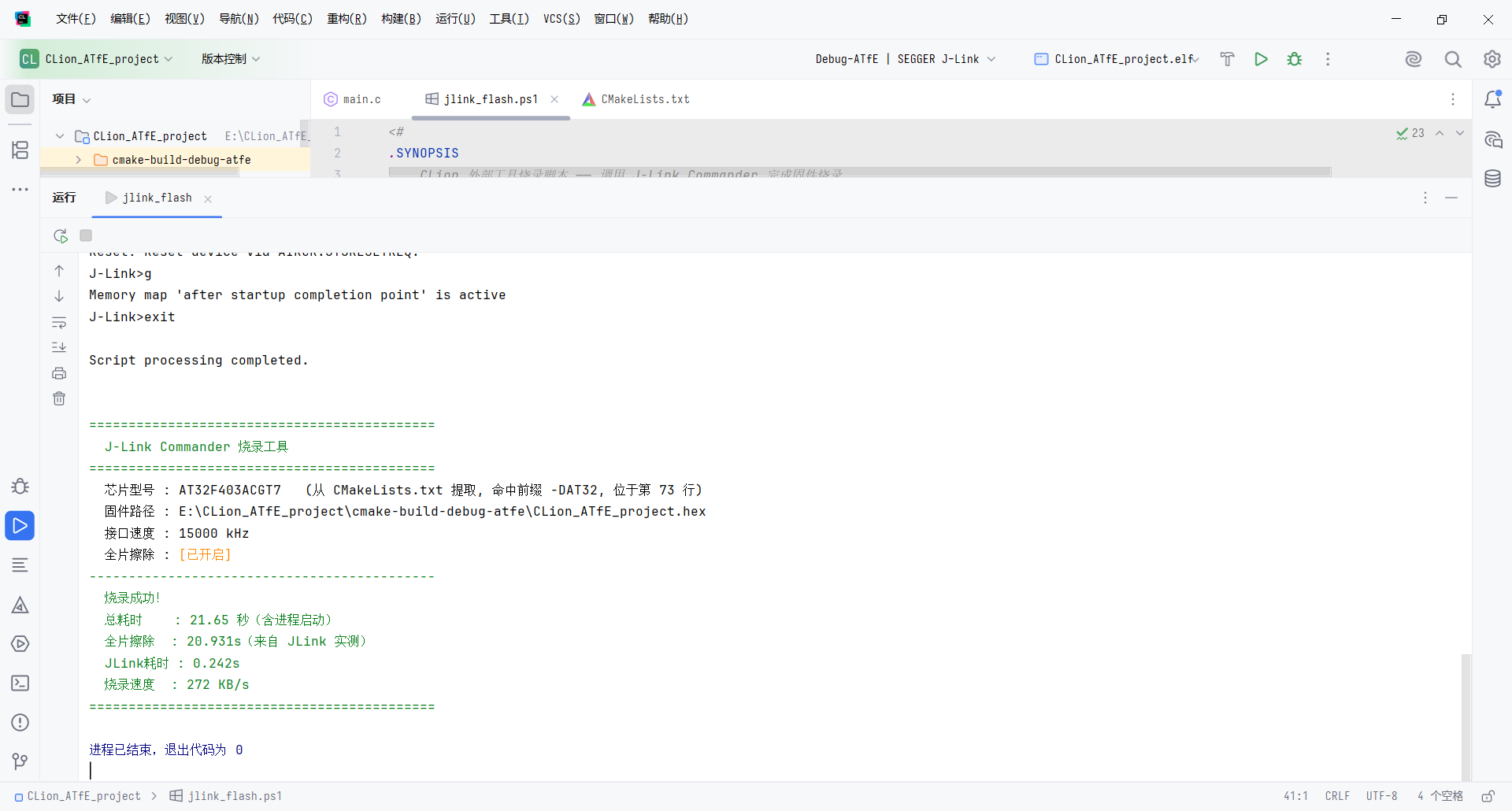
在运行窗口,输出执行烧录的汇总信息。烧录失败红色,烧录成功绿色。


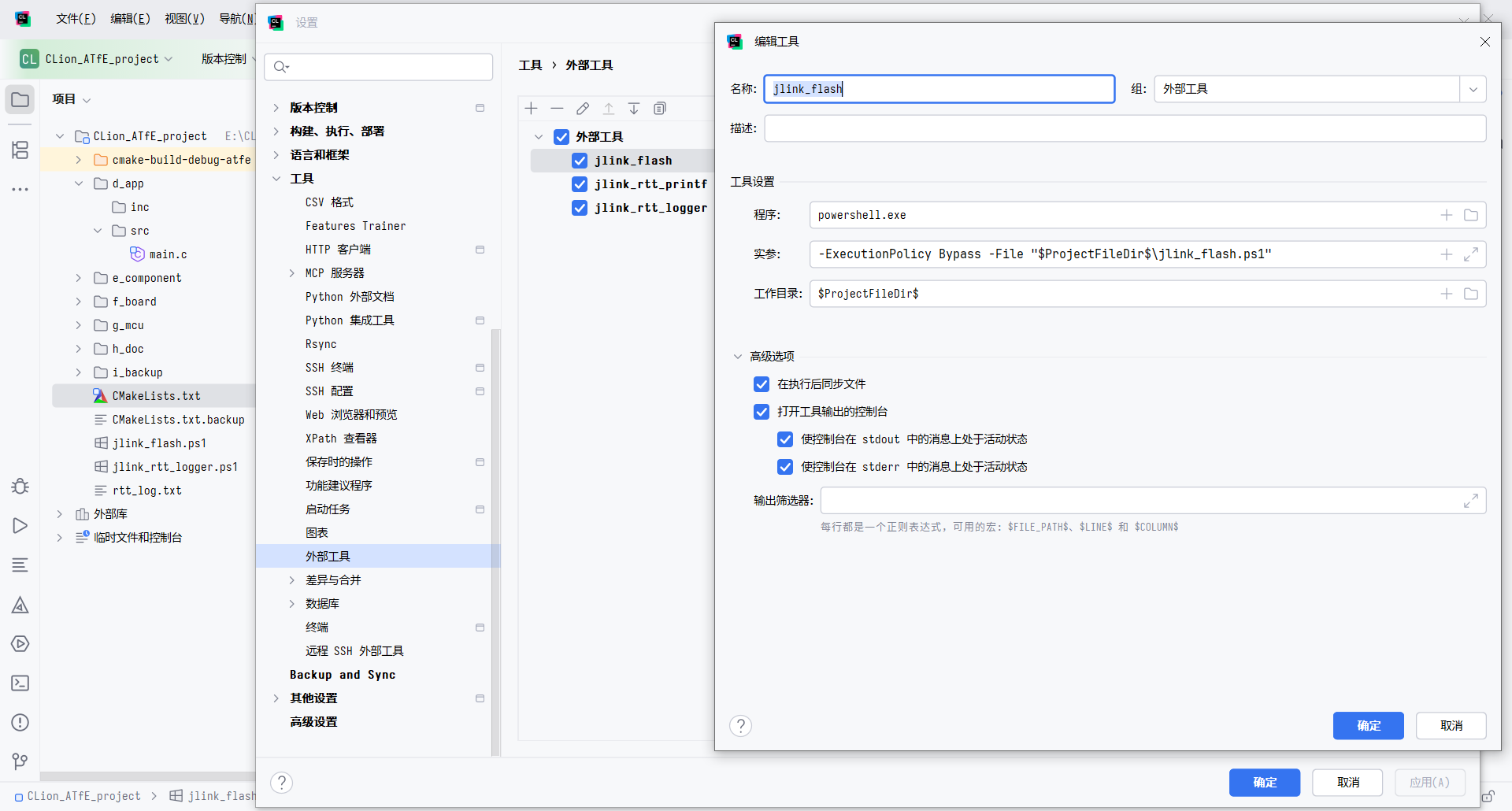
CLion外部工具设置
CLion外部工具设置.png


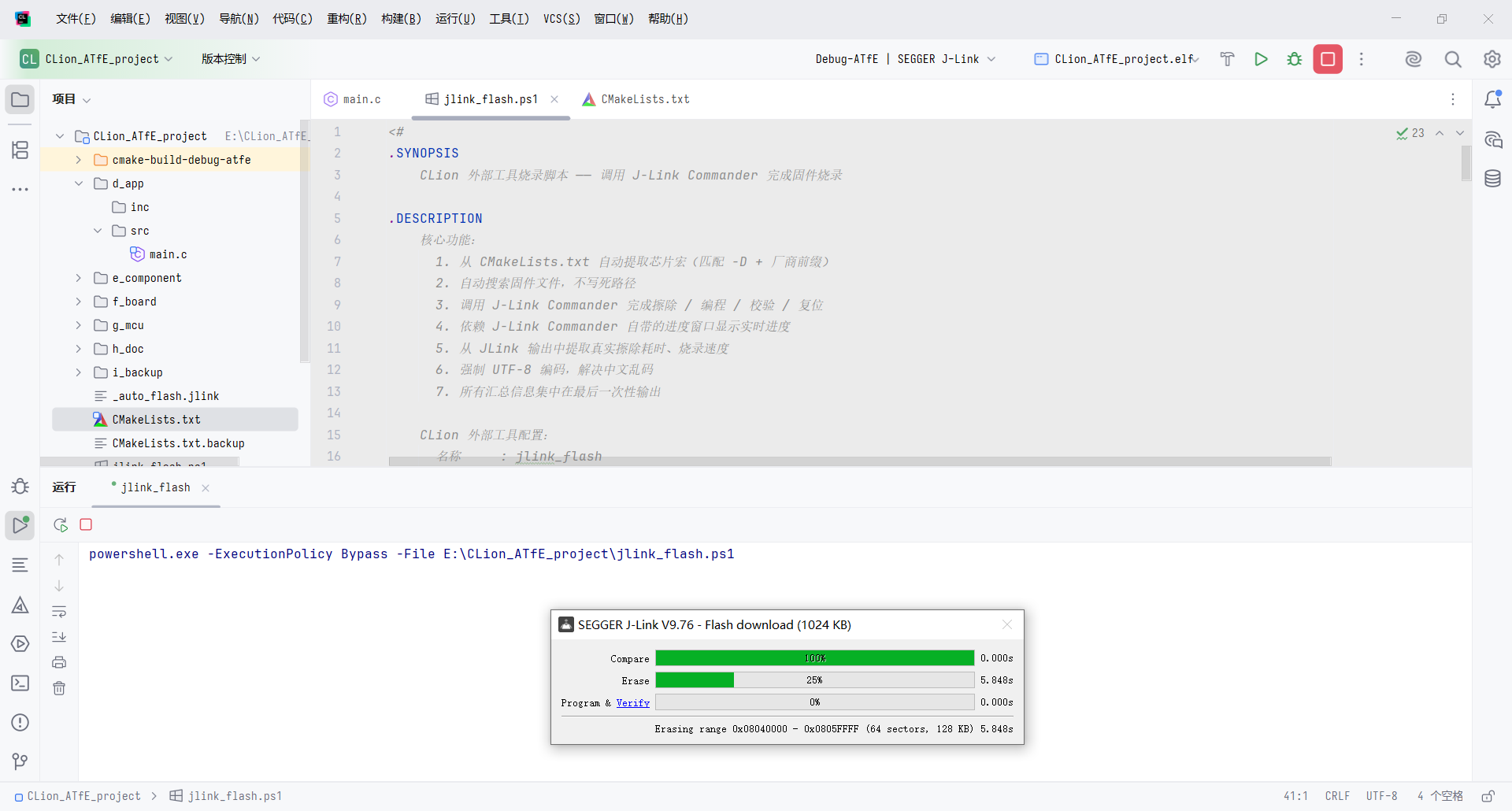
CLion外部工具调用jlink命令行,进行全片擦除
CLion外部工具调用jlink命令行全片擦除.png


CLion外部工具一键烧录固件,汇总执行信息
CLion外部工具一键烧录固件汇总信息.png


CMakeLists.txt文件中的宏定义
CMakeLists.txt文件中的宏定义.png


项目根目录下,新建jlink_flash.ps1脚本文件,保存为UTF-8 with BOM 编码,内容如下:
<#
.SYNOPSIS
    CLion 外部工具烧录脚本 —— 调用 J-Link Commander 完成固件烧录
    本文件必须,保存为UTF-8 with BOM编码!!!
.DESCRIPTION
    核心功能:
      1. CMakeLists.txt 自动提取芯片宏(匹配 -D + 厂商前缀)
      2. 自动搜索固件文件,不写死路径
      3. 调用 J-Link Commander 完成擦除 / 编程 / 校验 / 复位
      4. 依赖 J-Link Commander 自带的进度窗口显示实时进度
      5. JLink 输出中提取真实擦除耗时、烧录速度
      6. 强制 UTF-8 编码,解决中文乱码
      7. 所有汇总信息集中在最后一次性输出
    CLion 外部工具配置:
      名称     : jlink_flash
程序     : powershell.exe
参数     : -ExecutionPolicy Bypass -File "$ProjectFileDir$\jlink_flash.ps1"
工作目录 : $ProjectFileDir$
高级选项:全部勾选
#>
param(
    [
string$Firmware = "",
    [string$Device   = "",
    [int$Speed       = 0,
    [switch$EraseChip
)

# ============================================================
# ★★★ 用户配置区 —— 所有可调项集中在这里 ★★★
# ============================================================
# J-Link Commander 可执行文件路径
$JLinkExe = "C:\Program Files\SEGGER\JLink_V976\JLink.exe"

# 芯片型号
#   "AUTO"  = CMakeLists.txt 自动提取芯片宏
#   其他值  = 手动指定(覆盖自动提取)
$DeviceName = "AUTO"

# CMakeLists.txt 的相对路径(相对于项目根目录)
$CMakeListsPath = "CMakeLists.txt"

# 芯片厂商前缀白名单
# 只有 -D 后面紧跟这些前缀的宏才会被识别为芯片型号。
# 需要支持新厂商时,往数组里加一行即可。
$ChipPrefixes = @(
   
'AT32',      # 雅特力 Artery
'STM32',     # 意法半导体 ST
'GD32',      # 兆易创新 GigaDevice
'APM32'      # 极海 Geehy
)

# SWD 接口速度(kHz
$InterfaceSpeed = 15000
# 全片擦除开关
$EnableEraseChip = $true
# 固件搜索模式(通配符,适配所有 cmake-build-* 目录)
$FirmwareSearchPattern = "cmake-build-*\*.hex"

# ============================================================
# 以下为脚本逻辑,一般无需修改
# ============================================================
# ---- 命令行参数覆盖配置区 ----
if ($Device -ne "") { $DeviceName = $Device }
if ($Speed  -gt 0)  { $InterfaceSpeed = $Speed }
if ($EraseChip)     { $EnableEraseChip = $true }

# ---- 修复中文乱码:强制 UTF-8 编码 ----
$null = chcp 65001
[Console]::OutputEncoding = [System.Text.Encoding]::UTF8
$OutputEncoding = [System.Text.Encoding]::UTF8

# ---- ANSI 颜色辅助函数 ----
$ESC = [char27
function Write-Color {
   
param(
        [Parameter(
Mandatory = $true, Position = 0)][string$Text,
        [Parameter(Position = 1)]
        [ValidateSet(
'Green', 'Yellow', 'Red', 'Cyan', 'DarkGray', 'White', 'Gray', 'Orange')]
        [
string$Color = 'White'
    )
   
$code = switch ($Color) {
        
'Green'    { "$ESC[32m" }
        
'Yellow'   { "$ESC[33m" }
        
'Red'      { "$ESC[31m" }
        
'Cyan'     { "$ESC[36m" }
        
'DarkGray' { "$ESC[90m" }
        
'Gray'     { "$ESC[37m" }
        
'White'    { "$ESC[37m" }
        
'Orange'   { "$ESC[38;5;208m" }
        
default    { "$ESC[37m" }
    }
    Write-Host
"$code$Text$ESC[0m"
}

# ---- 解析路径 ----
$ProjectRoot = $PSScriptRoot

# ============================================================
# CMakeLists.txt 提取芯片宏
# ============================================================
# 匹配规则:-D + 厂商前缀 + 任意字母数字
# 例:命中前缀 AT32 → 抓取完整宏名 AT32F403ACGT7
# 逐行扫描,记录命中所在的行号,便于用户定位。
function Get-ChipMacroFromCMake {
   
param(
        [
string$CMakeFile,
        [string[]]$Prefixes
    )

   
if (-not (Test-Path $CMakeFile)) { return $null }

   
try {
        
# 逐行读取(不用 -Raw),这样才能拿到行号
$lines = @(Get-Content -Path $CMakeFile -Encoding UTF8)
    }
catch {
        
return $null
}

   
# 构造前缀匹配组,例如 (AT32|STM32|GD32|APM32)
$prefixGroup = ($Prefixes | ForEach-Object { [regex]::Escape($_) }) -join '|'

    # 正则说明:
#   -D              命令行宏前缀
#   (前缀组)        必须命中白名单中的某个前缀
#   [A-Za-z0-9]+    前缀后续的字母数字(型号主体)
$regex = [regex"-D(($prefixGroup)[A-Za-z0-9]+)"

    # 逐行扫描,返回第一个匹配
for ($i = 0; $i -lt $lines.Count; $i++) {
        
$line = $lines[$i]
        
if ($null -eq $line) { continue }

        
$m = $regex.Match($line)
        
if ($m.Success) {
            
return @{
               
FullName   = $m.Groups[1].Value   # 完整芯片名,如 AT32F403ACGT7
Prefix     = $m.Groups[2].Value   # 命中的前缀,如 AT32
LineNumber = $i + 1                # 行号从 1 开始
}
        }
    }
   
return $null
}

# ---- 处理芯片型号自动提取 ----
$chipPrefix     = ""
$chipLineNumber = 0
$chipSourceInfo = ""   # 芯片型号来源说明,用于最后汇总显示
if ($DeviceName -eq "AUTO" -or $DeviceName -eq "") {
   
$cmakeFullPath = Join-Path $ProjectRoot $CMakeListsPath
    $result        = Get-ChipMacroFromCMake -CMakeFile $cmakeFullPath -Prefixes $ChipPrefixes

    if (-not $result) {
        Write-Color
"[错误] 未能从 $CMakeListsPath 提取芯片宏。" -Color Red
        Write-Color
"       已启用的厂商前缀:$($ChipPrefixes -join ', ')" -Color Red
        Write-Color
"       请检查 CMakeLists.txt 是否包含形如 -DAT32xxxx 的宏," -Color Yellow
        Write-Color
"       或往 `$ChipPrefixes 里补充你芯片的厂商前缀," -Color Yellow
        Write-Color
"       或手动修改脚本中 `$DeviceName 为具体型号。" -Color Yellow
        
exit 1
}

   
$DeviceName     = $result.FullName
    $chipPrefix     = $result.Prefix
    $chipLineNumber = $result.LineNumber
    $chipSourceInfo = "$CMakeListsPath 提取, 命中前缀 -D$chipPrefix, 位于第 $chipLineNumber "
}
else {
   
$chipSourceInfo = "手动指定"
}

# ---- 定位固件文件 ----
$FirmwarePath = $null
if ($Firmware -ne "") {
   
$candidate = Join-Path $ProjectRoot $Firmware
    if (Test-Path $candidate) { $FirmwarePath = (Resolve-Path $candidate).Path }
}

if (-not $FirmwarePath) {
   
$searchPath = Join-Path $ProjectRoot $FirmwareSearchPattern
    $candidates = @(Get-ChildItem -Path $searchPath -ErrorAction SilentlyContinue)

   
if ($candidates.Count -eq 0) {
        Write-Color
"[错误] 未找到任何固件文件。" -Color Red
        Write-Color
"       搜索路径:$searchPath" -Color Red
        Write-Color
"       请确认已执行编译(Build),或手动指定 -Firmware 参数。" -Color Yellow
        
exit 1
}
   
elseif ($candidates.Count -eq 1) {
        
$FirmwarePath = $candidates[0].FullName
    }
   
else {
        
$FirmwarePath = ($candidates | Sort-Object LastWriteTime -Descending | Select-Object -First 1).FullName
        Write-Color
"[提示] 找到多个固件文件,自动使用最近修改的:" -Color Yellow
        
foreach ($c in $candidates) {
            
$marker = if ($c.FullName -eq $FirmwarePath) { ">>" } else { "  " }
            Write-Color
"       $marker $($c.FullName)" -Color DarkGray
        }
    }
}

# ---- 校验 J-Link 可执行文件 ----
if (-not (Test-Path $JLinkExe)) {
    Write-Color
"[错误] 未找到 JLink.exe$JLinkExe" -Color Red
    Write-Color
"       请检查脚本中 `$JLinkExe 变量是否指向正确的 J-Link 安装路径。" -Color Yellow
   
exit 1
}

# ---- 生成 .jlink 命令脚本 ----
$jlinkCommands = @()
$jlinkCommands += "si SWD"
$jlinkCommands += "speed $InterfaceSpeed"

if ($EnableEraseChip) {
   
$jlinkCommands += "erase"
}

$jlinkCommands += "loadfile `"$FirmwarePath`""
$jlinkCommands += "r"
$jlinkCommands += "g"
$jlinkCommands += "exit"

$jlinkScriptFile = Join-Path $ProjectRoot "_auto_flash.jlink"
($jlinkCommands -join "`n") | Out-File -FilePath $jlinkScriptFile -Encoding ASCII

# ---- 执行烧录 ----
$psi = New-Object System.Diagnostics.ProcessStartInfo
$psi.FileName               = $JLinkExe
$psi.Arguments              = "-device `"$DeviceName`" -if SWD -speed $InterfaceSpeed -autoconnect 1 -ExitOnError 1 -CommandFile `"$jlinkScriptFile`""
$psi.UseShellExecute        = $false
$psi.RedirectStandardOutput = $true
$psi.RedirectStandardError  = $true
$psi.CreateNoWindow         = $true
$process = New-Object System.Diagnostics.Process
$process.StartInfo = $psi

$startTime  = Get-Date
$speedInfo  = ""
$jlinkTotal = ""
$eraseInfo  = ""
$skipped    = $false
$null = $process.Start()
$stderrTask = $process.StandardError.ReadToEndAsync()
$stdout     = $process.StandardOutput

$readTask    = $null
$streamEnded = $false
while (-not $process.HasExited -or -not $streamEnded) {

   
if (-not $streamEnded -and $null -eq $readTask) {
        
$readTask = $stdout.ReadLineAsync()
    }

   
if ($readTask -and $readTask.Wait(500)) {
        
$line = $readTask.Result
        $readTask = $null
if ($null -eq $line) { $streamEnded = $true; continue }

        Write-Host
$line

        if ($line -match 'Program & Verify speed:\s*([\d.]+\s*KB/s)') {
            
$speedInfo = $matches[1]
        }
        
elseif ($line -match 'Flash download: Total time needed:\s*([\d.]+)s.*Erase:\s*([\d.]+)s') {
            
$eraseInfo = $matches[2] + "s"
        }
        
elseif ($line -match 'Flash download: Total:\s*([\d.]+s)') {
            
$jlinkTotal = $matches[1]
        }
        
elseif ($line -match 'Skipped\. Contents already match') {
            
$skipped = $true
}
    }
}

$process.WaitForExit()
$exitCode = $process.ExitCode
$elapsed  = (Get-Date) - $startTime

Remove-Item $jlinkScriptFile -Force -ErrorAction SilentlyContinue

# ---- 全片擦除状态字符串 ----
$eraseChipText = if ($EnableEraseChip) { "[已开启]" } else { "[已关闭]" }

# ---- 芯片型号显示行(含来源说明)----
if ($chipSourceInfo) {
   
$chipDisplayLine = "$DeviceName   ($chipSourceInfo)"
} else {
   
$chipDisplayLine = $DeviceName
}

# ---- 结果汇总 ----
Write-Host ""
if ($exitCode -eq 0) {
    Write-Color
"============================================" -Color Green
    Write-Color
"  J-Link Commander 烧录工具" -Color Green
    Write-Color
"============================================" -Color Green
    Write-Host
"  芯片型号 : $chipDisplayLine"
    Write-Host "  固件路径 : $FirmwarePath"
    Write-Host "  接口速度 : $InterfaceSpeed kHz"
    Write-Host -NoNewline "  全片擦除 : "
    Write-Color $eraseChipText -Color Orange
    Write-Color
"--------------------------------------------" -Color Green
    Write-Color
"  烧录成功!" -Color Green
    Write-Color
"  总耗时    : $([math]::Round($elapsed.TotalSeconds, 2)) 秒(含进程启动)" -Color Green

   
if ($eraseInfo) { Write-Color "  全片擦除  : $eraseInfo(来自 JLink 实测)" -Color Green }

   
if ($skipped) {
        Write-Color
"  烧录状态  : 内容一致,跳过烧录(Flash 无需更新)" -Color Yellow
    }
else {
        
if ($jlinkTotal) { Write-Color "  JLink耗时 : $jlinkTotal" -Color Green }
        
if ($speedInfo)  { Write-Color "  烧录速度  : $speedInfo" -Color Green }
    }
    Write-Color
"============================================" -Color Green
}
else {
    Write-Color
"============================================" -Color Red
    Write-Color
"  J-Link Commander 烧录工具" -Color Red
    Write-Color
"============================================" -Color Red
    Write-Host
"  芯片型号 : $chipDisplayLine"
    Write-Host "  固件路径 : $FirmwarePath"
    Write-Host "  接口速度 : $InterfaceSpeed kHz"
    Write-Host -NoNewline "  全片擦除 : "
    Write-Color $eraseChipText -Color Orange
    Write-Color
"--------------------------------------------" -Color Red
    Write-Color
"  烧录失败!" -Color Red
    Write-Color
"  JLink 退出码 : $exitCode" -Color Red
    Write-Color
"  请检查以下常见原因:" -Color Yellow
    Write-Color
"    - J-Link 是否已连接并被识别" -Color Yellow
    Write-Color
"    - 目标芯片是否已上电" -Color Yellow
    Write-Color
"    - 固件文件是否完整" -Color Yellow
    Write-Color
"============================================" -Color Red
   
exit $exitCode
}


回复

使用道具 举报

0

主题

2

回帖

2

积分

新手上路

积分
2
发表于 7 天前 | 显示全部楼层
牛啊,学习了学习了
回复

使用道具 举报

0

主题

45

回帖

45

积分

新手上路

积分
45
发表于 6 天前 | 显示全部楼层
现代IDE,RTOS的trace也挺好
回复

使用道具 举报

您需要登录后才可以回帖 登录 | 立即注册

本版积分规则

QQ|小黑屋|Archiver|手机版|硬汉嵌入式论坛

GMT+8, 2026-9-23 07:47 , Processed in 0.168036 second(s), 25 queries .

Powered by Discuz! X3.4 Licensed

Copyright © 2001-2023, Tencent Cloud.

快速回复 返回顶部 返回列表